


For padel, tennis and pickleball clubs on Playtomic
Show your Playtomic courts on every TV in the club
Free courts, open matches and today's programme come straight from your Playtomic bookings and refresh every few minutes. Nobody at reception types a schedule again.
Connects with your own Playtomic keys. Runs on Android TV, Chromecast, Amazon Fire and Xiaomi screens.
Already running in padel clubs
Three questions your front desk answers all day
Each one has a screen that answers it before the player reaches reception.
Is there a free court right now?
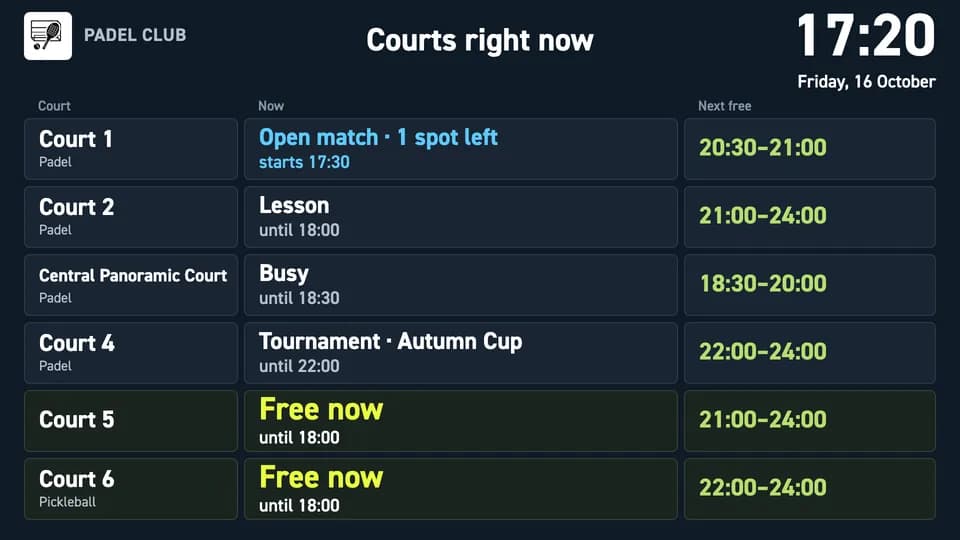
Courts right now lists every court with what is on it and its next free slot. Free courts stand out, with the time they stay free.
Screen: Courts right now
Who plays next on court 3?
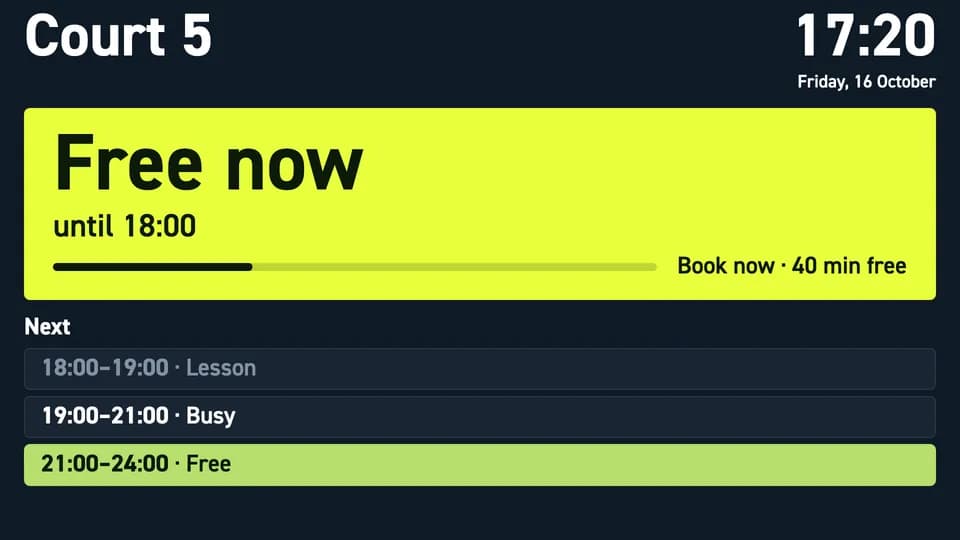
The door sign at the court shows what it is doing now, the minutes left and the rest of its day.
Screen: Door sign
Is there an open match I can join?
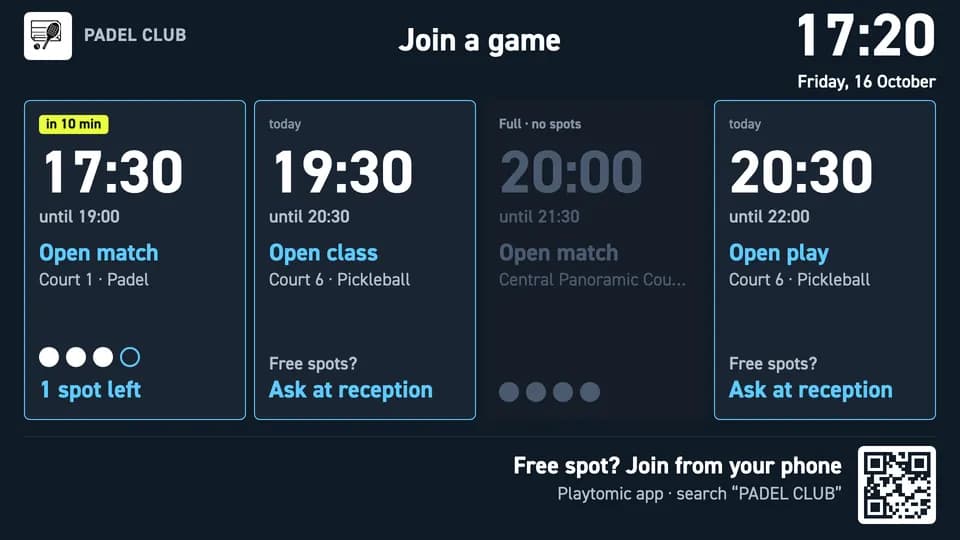
Join a game lists today's open matches with the spots left and a QR code players scan to join from their phone.
Screen: Join a game
Your bookings, working on every screen
Fill the quiet hours
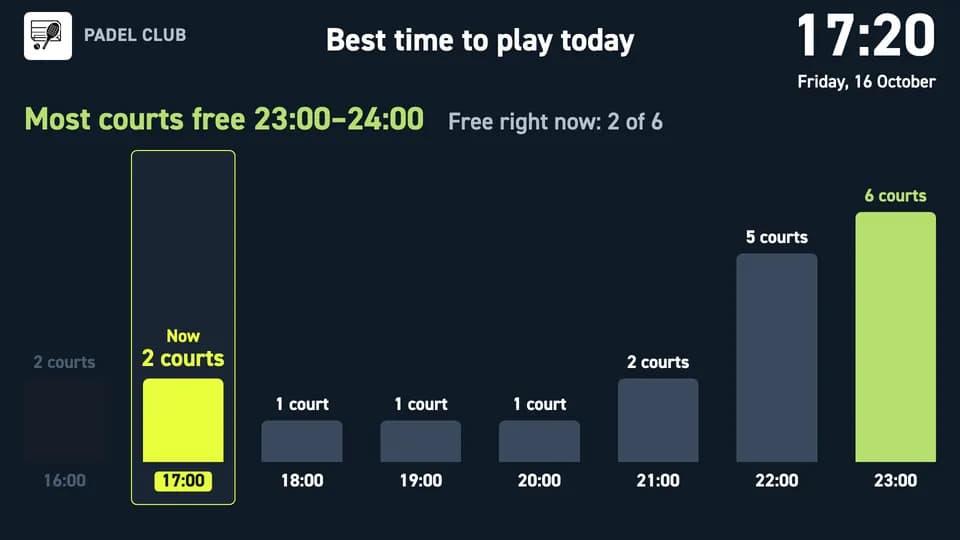
Best time to play shows how many courts are free in each hour until closing and names the best window. Courts right now catches the players who walk in without a booking. The screen nudges players towards the quieter hours, so more of your court time gets booked.
Screens: Best time to play, Courts right now
Complete open matches
An open match with one missing player is a lost booking. Join a game puts it on the lounge TV with "1 spot left" and a QR code, so the player waiting at the bar becomes the fourth player.
Screens: Join a game, Today at the club
Free the front desk
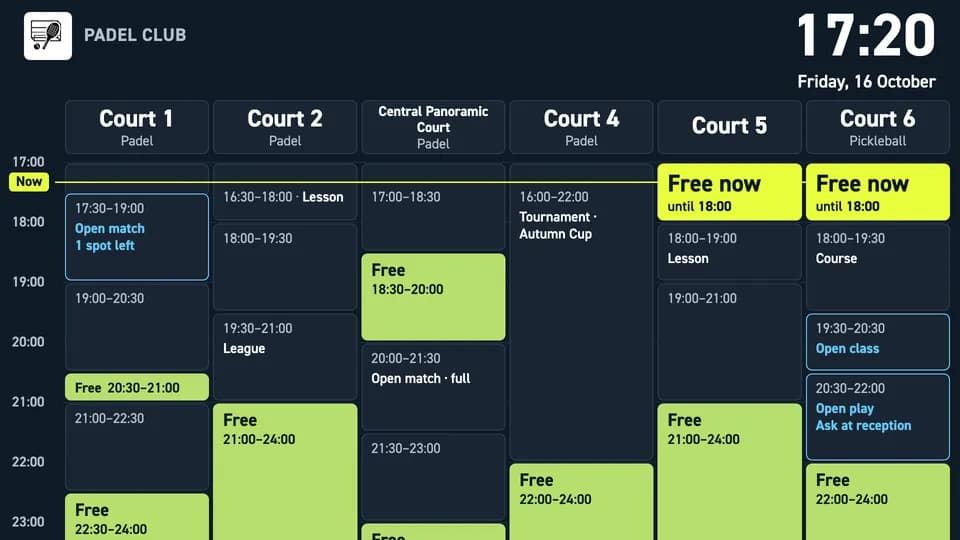
Connect Playtomic once and the screens refresh by themselves every few minutes. The court schedule answers "Is there a free court?" before anyone asks, and door signs tell each group when the court is theirs.
Screens: Court schedule, Door sign
10 screens, one Playtomic connection
Every screen comes in a horizontal and a vertical version. Pick a spot in the club, then the screen that answers what players ask there.
Showing 10 of 10 screens, horizontal
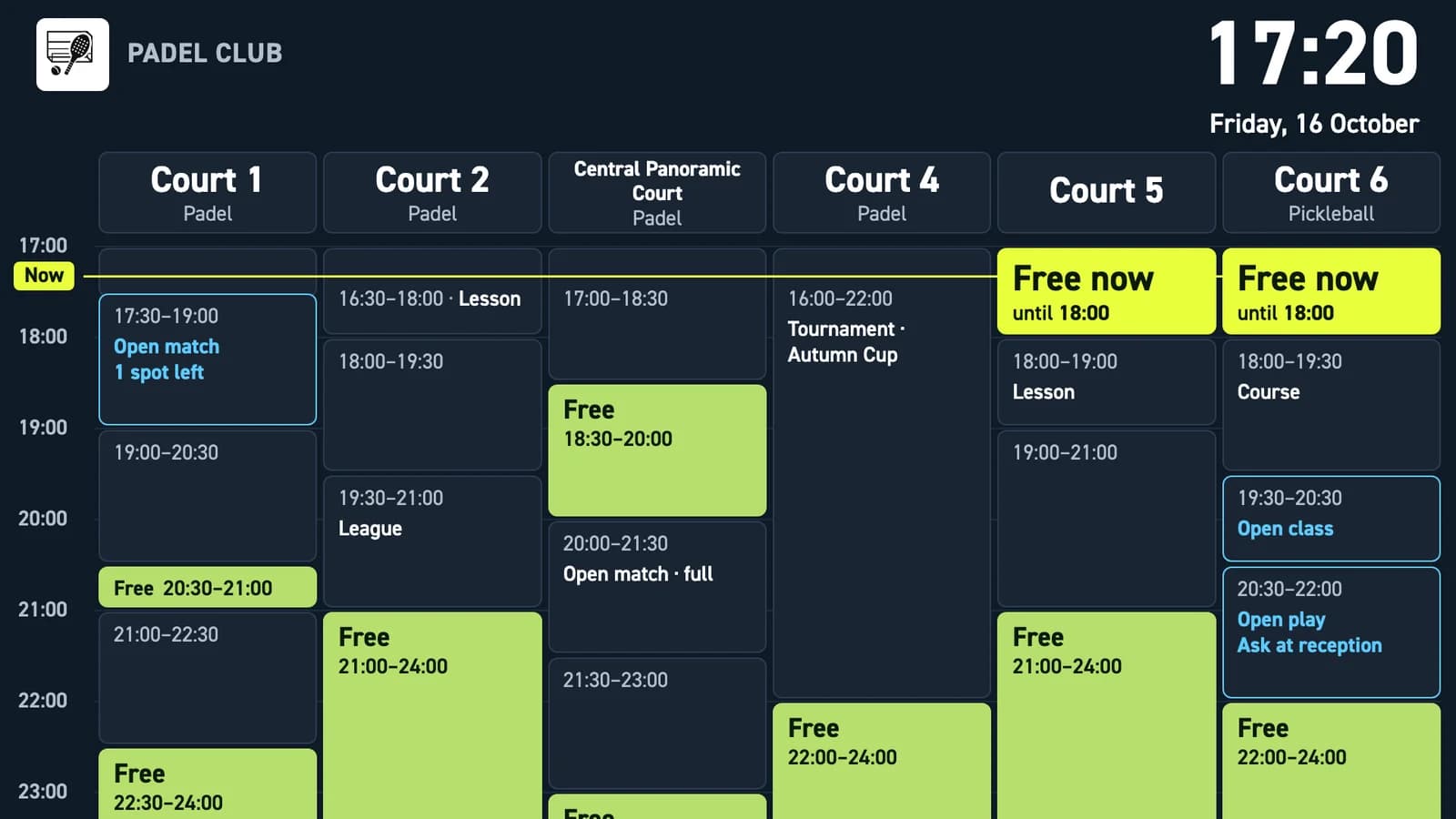
Court schedule
What is happening on every court today?
The full day of every court side by side, with a Now line that moves with the clock. Free slots are green, open matches show how many spots are left, and each court shows its sport.
One look tells players and staff where there is room today, without opening the app.
Reception
Courts right now
Which court is free right now, and when is the next free slot?
One row per court with what is on it now and its next free window. Free courts stand out with the time they stay free, and larger clubs flip through their courts in blocks.
The fastest answer to "Can I play now?" for players who walk in without a booking.
Reception · Entrance
Join a game
Which open matches and classes still have a spot today?
Today's open matches, open classes and open play as big cards with time, court, sport and free spots, plus a countdown to the next one. A QR code at the bottom lets players join from their phone.
It turns the people waiting in the lounge into the fourth player.
Lounge and bar
Today at the club
What is on today: lessons, courses, leagues, tournaments?
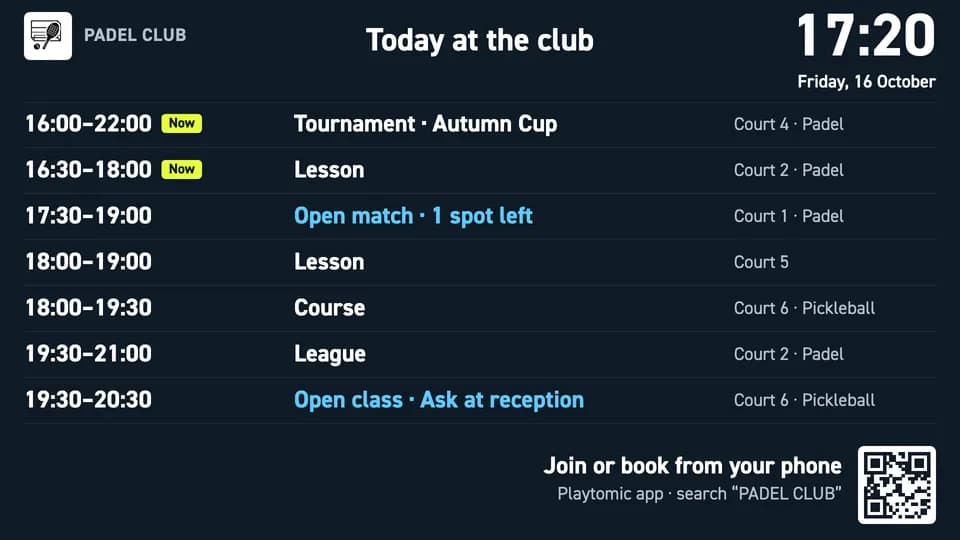
Everything still to come today in time order, each line with its court and sport. What is running now is marked Now, and open games show their free spots next to the same QR code as Join a game.
Players see the day's programme and sign up from their phone.
Entrance · Lounge and bar
Door sign
Is this court free, and who plays next?
One screen for one court: its name and sport, what it is doing now (Free now, Busy, Lesson, Open match and more), a progress bar with the minutes left, and the rest of its day.
Players find their court without asking, and the next group knows exactly when the court is theirs.
Court doors
Best time to play
When is it easiest to get a court today?
How many courts are free in each hour, from the hour before now until closing. The headline names the best window, and a line shows how many courts are free this minute.
It nudges players towards quieter hours, so more of your court time gets booked.
Reception · Entrance
Club pulse
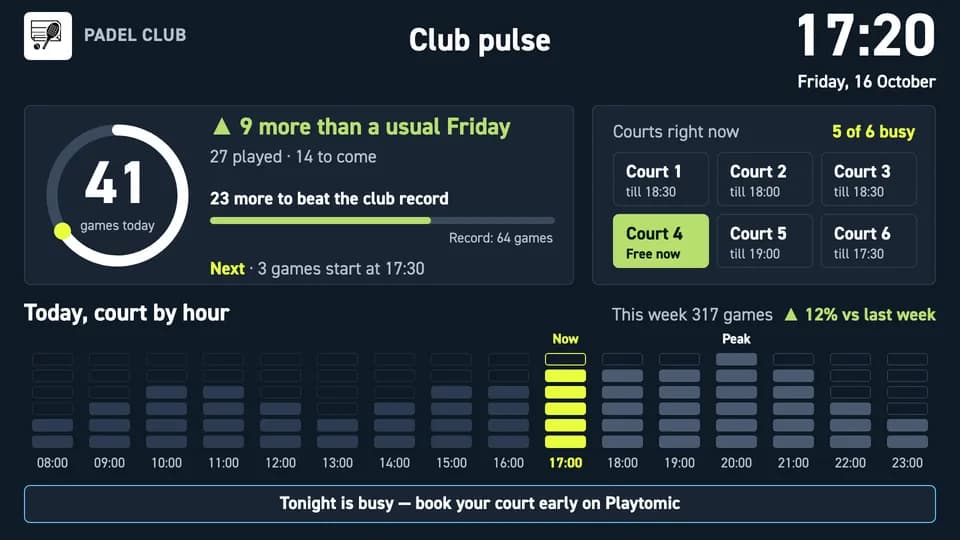
How busy is the club today?
Today's games played and still to come against a usual day of the week, the club record and how many games are left to beat it, and which courts are free now.
Players like to see a lively club, and the record gives them a reason to book one more game.
Reception · Lounge and bar
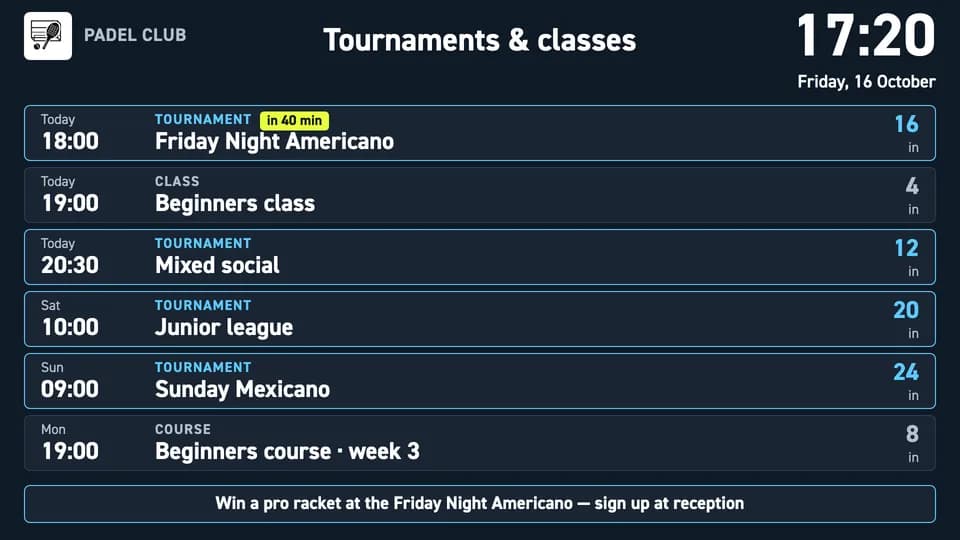
Tournaments & classes
What can I sign up for this week?
Tournaments, classes and courses for the next 7 days, day by day, each with its time, type and how many players are already in, plus a countdown to the next one.
Players see what they can sign up for this week without opening the app.
Lounge and bar · Entrance
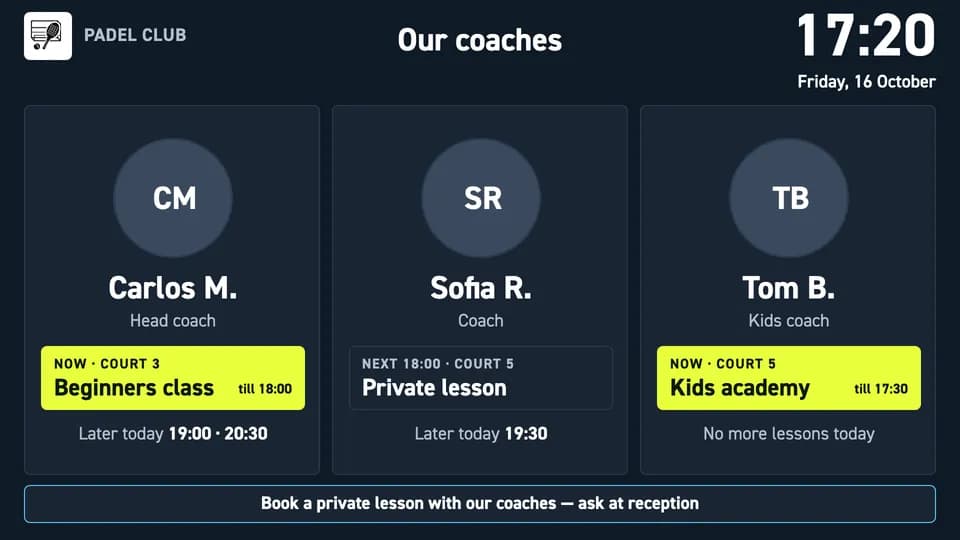
Our coaches
Who is teaching today, and when?
Up to four coaches with a photo and what each one is doing now, next and later today. You match each coach to Playtomic and add a name, a role and a photo.
Players get to know your coaches and book a lesson.
Reception · Lounge and bar
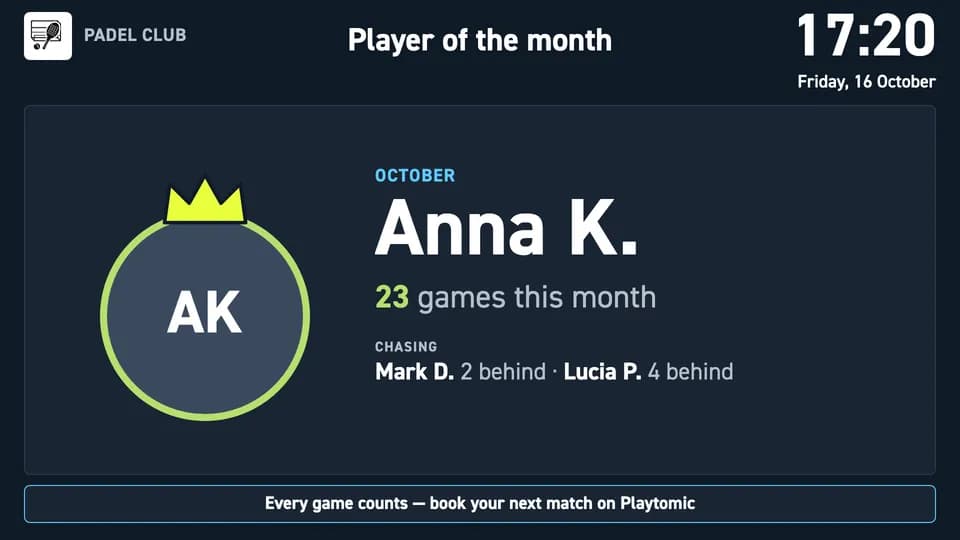
Player of the month
Who plays the most this month?
The player with the most games this month and the players chasing them. Names appear only after you switch them on in the widget settings, and you can hide anyone.
A friendly competition that brings players back more often.
Lounge and bar
Connect Playtomic to your TVs in 3 steps
Get your Playtomic keys
In Playtomic Manager, open Settings > Developer tools, create API credentials and copy the Client ID and Client secret. It takes a minute.
Connect your club and pick a screen
In Liqvid, open Widgets, choose Playtomic Screens and paste your keys. Pick one of the 10 screens and add your club name, logo and colours.
Publish to your TVs
Click Publish to send the screen to your TVs, or save it to a playlist next to your other content.
What you need
- A Playtomic account with API keys (Client ID and Client secret)
- A TV on the supported list: Android TV, Chromecast, Amazon Fire, Xiaomi
- A Liqvid account, free to create
Start on the Free plan
The Playtomic widget works on the Free plan: connect your club and put your first screen live without a paid subscription.
Start freeQuestions club owners ask
Does it work for tennis and pickleball clubs too?
Yes. The screens are built for padel, tennis and pickleball clubs, and each court shows its own sport.
How fast do new bookings appear on the screens?
Within a few minutes. The screens refresh by themselves every few minutes, so a booking made in Playtomic shows up shortly after, not instantly.
What do I need from Playtomic, and is there a free plan?
Your club's own API keys: in Playtomic Manager go to Settings > Developer tools and copy the Client ID and Client secret. If your club is not found from the keys, Playtomic Customer Care gives you the Club ID. The Playtomic widget works on the Liqvid Free plan.
Can I show several clubs?
Yes, with one widget per club. If your keys cover several clubs, you pick the club when you connect.
Which languages are available?
English, Spanish, Portuguese and Thai.
Which TVs does it run on?
Android TV, Chromecast, Amazon Fire and Xiaomi devices. Every screen comes in a horizontal and a vertical version, so it fits a wall TV at reception or a portrait screen at a court door.
How do players join a game from the screen?
Players scan the QR code on Join a game or Today at the club and join from their phone. By default the QR code opens your club's page on Playtomic, and you can set your own link in the widget settings.
Your Playtomic bookings are already there. Put them on screen.
Connect once with your own keys, pick a screen and publish. Every TV in the club then shows free courts and open matches by itself.
Playtomic is a trademark of its owner. Liqvid is not affiliated with Playtomic.